I run my own Calibre-Web server and added highlights, notes and a few reader changes to it (the setup is in an earlier article). A reader is a deceptive thing to test. Opening a book and turning ten pages proves very little. These four bugs only appeared after reading for real, for a long time, in the browser I actually use.
1. The tab that stopped saving
Highlights, notes and the reading position are saved to the server as you go. In a tab left open for more than an hour, the saves started failing.
Calibre-Web protects those requests with a CSRF token, and the token expires after an hour. Every save reads it from a hidden form field. A reader who stays on one page for longer than that is holding a dead token, and the server refuses every save with a 400.
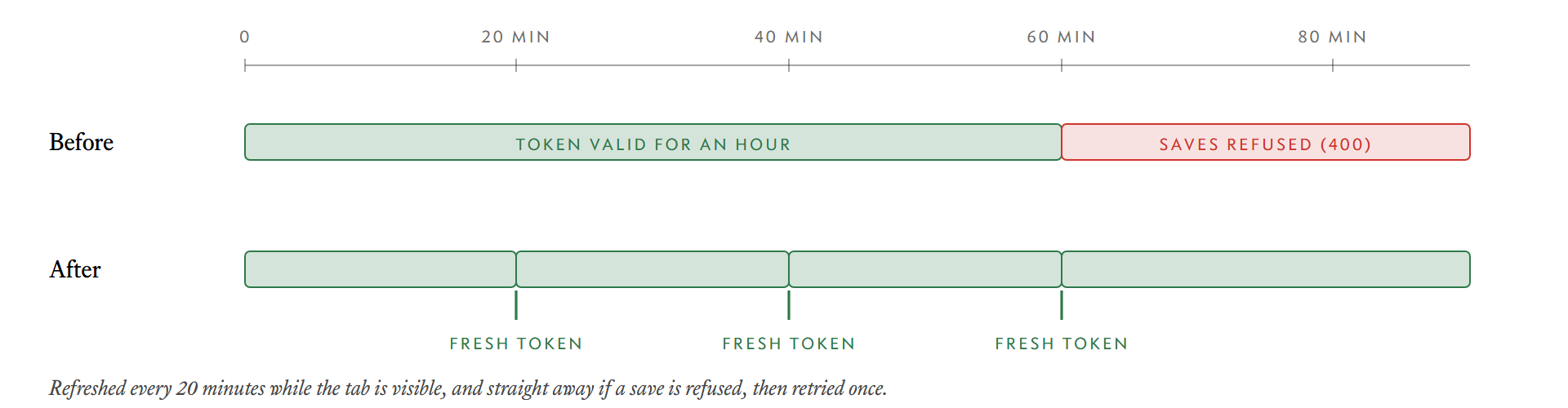
The fix is a keep-alive. While the tab is visible, it fetches a fresh token every 20 minutes, and it checks again whenever a hidden tab becomes visible. If a save is refused anyway, the code fetches a new token and retries once:
var CSRF_MAX_AGE = 20 * 60 * 1000
function keepCsrfFresh() {
  if (document.visibilityState !== 'hidden' && Date.now() - csrfAt > CSRF_MAX_AGE) refreshCsrf()
}
setInterval(keepCsrfFresh, 60 * 1000)
document.addEventListener('visibilitychange', keepCsrfFresh)
The retry is limited to one, and only for a 400 that does not carry the reader's own JSON error. A token problem and a real validation failure should not be confused.
2. Page-turn zones that swallowed the text
Tapping near the left or right edge turns the page. The original zones for this were tall, padded columns that overlapped the first and last characters of every line. Starting a text selection at the edge of a line turned the page instead.
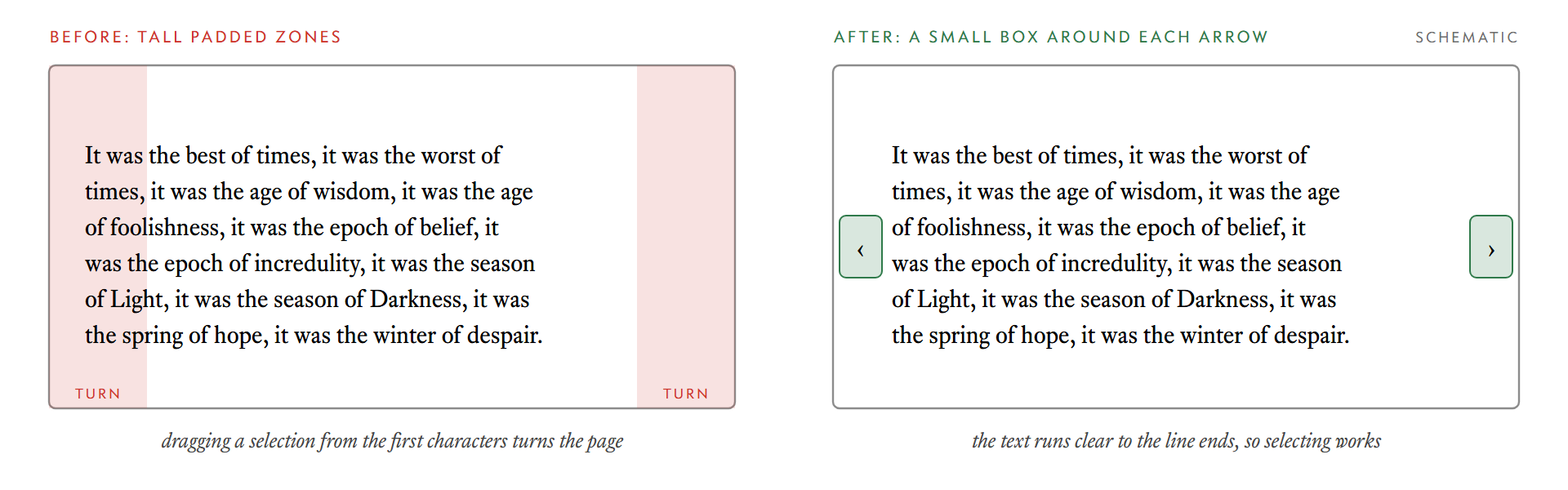
It was fixed in two steps. First the zones were kept inside the margins, so the text itself is never covered. Then, in a follow-up, they were shrunk to a small box around each arrow glyph. The lesson is a general one about hit targets: the click area of a control should be what it looks like, not what is convenient to code.
3. Chapters that were taller than they measured
The EPUB reader uses epub.js, which lays each chapter out in columns inside an iframe. It sizes the iframe once, before my typography changes are applied, and then never notices the text grow. After the page had its final fonts, the chapter was wider than its container. The last columns of a chapter could not be reached, and the next page jumped straight to the next chapter.
The first fix was to ask epub.js to measure again after the typography hooks ran. That was not enough, because it depended on epub.js noticing the change and on the browser measuring multi-column text correctly. The reader now:
- counts the last character and the body's scroll width when it measures,
- checks every shown chapter after the hooks run, when fonts load, every 700 ms, on page turns and before moving to the next page,
- expands any chapter that has outgrown its box, and
- redraws highlights when line breaks move, since a highlight is positioned from where the text wrapped.
A diagnostic log records what the reader saw and what it decided, because a bug like this cannot be reproduced on demand. Each entry gives the environment, the measured width and the fit that was applied.
4. The browser that adds noise
The last one took the longest to explain. In Brave, turning to the next page sometimes stopped a spread early, and turning back from the second page could do nothing on a first spread.
Brave adds a small amount of noise to devicePixelRatio as a fingerprinting protection. In a column layout, the page boundaries are positions in fractions of a pixel, so after the noise, scrollLeft lands a fraction away from where a strict comparison expects it.
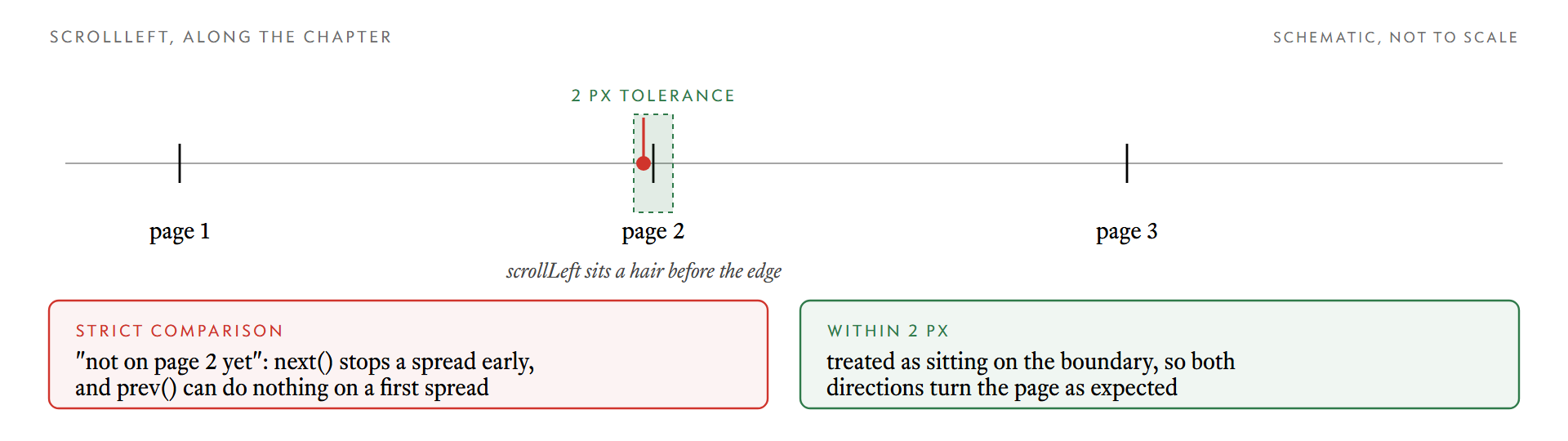
The fix is a tolerance. The reader decides both directions with a 2 px margin, so a position that is within two pixels of a page edge counts as being on it:
// sketch of the check, not the exact code
var onBoundary = Math.abs(scrollLeft - pageStart) <= 2
I would not have found this from a layout bug report, because the layout was correct. The bug was that equality on a floating-point pixel position is a fragile thing to depend on, and one browser makes that visible.
What they have in common
None of these show up in a quick test. They need an hour of elapsed time, a real book with real fonts, a particular browser, or a selection that starts at the edge of a line. If you build on top of someone else's reader or editor, the useful habit is to use it for what it is for, for long enough, before trusting it.