My books live on a server I run myself, at an address of my own, and I can read them in a browser on any device. It took a migration, a few careful decisions about backups, and eventually some patches to the reader.
The setup
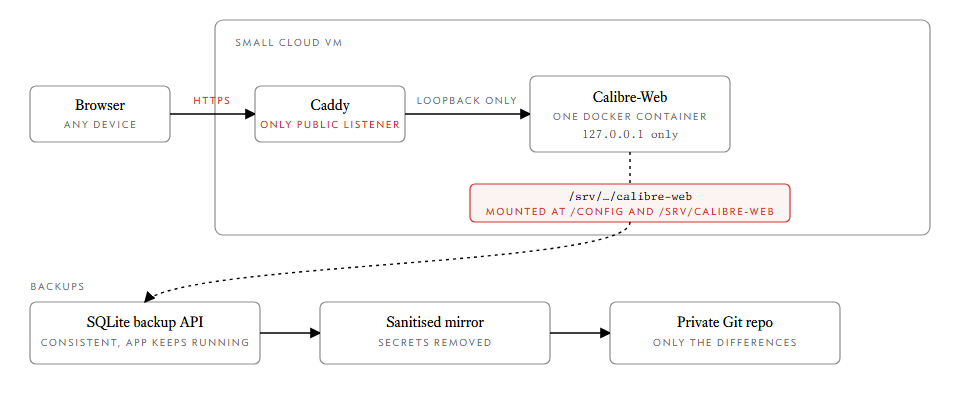
Calibre-Web is a web front end for a normal Calibre library. It runs as one Docker container on a small cloud VM, and Caddy sits in front of it as the only public listener. The container binds to loopback only, so nothing reaches it except through Caddy.
The Compose file is short. The interesting parts are the comments, because I wrote them for the person who has to maintain this later:
services:
  calibre-web:
    image: calibre-web:mobi-20261016t142128z
    container_name: recovery-calibre-web
    restart: unless-stopped
    environment:
      PUID: "999"
      PGID: "988"
      TZ: "Asia/Kolkata"
      DOCKER_MODS: linuxserver/mods:universal-calibre
    volumes:
      - /srv/recovery-extracted/srv/calibre-web:/config
      - /srv/recovery-extracted/srv/calibre-web:/srv/calibre-web
A mount I will never tidy up
That same directory is mounted twice, which looks like a mistake. It is not. The
application database remembers the library path from the old host, so mounting
the data at both /config and /srv/calibre-web makes the restored app work
without editing the database. The Compose file says so in capital letters, and
the PUID and PGID match the numeric ownership of the restored files, whatever
names those ids happen to map to on the new machine.
Back up the database properly
A Calibre library is mostly files, but the state that is easy to corrupt lives in SQLite: users, settings and reading positions. Copying a SQLite file while the app is running can give you a broken copy. So the snapshot script uses SQLite's own backup API, which produces a consistent copy while the app keeps running, and it only reads from the server. Nothing is stopped.
A local snapshot is not enough, so a second step publishes a sanitised mirror to
a private Git repository. It removes keys, client secrets and tokens, and inside
every database it replaces user passwords with RESET-ON-RESTORE and clears
sessions. Because robocopy only rewrites changed files and Git stores only
changed content, each run uploads just the differences. The books go up once.
One rule I wrote down in the README: Git keeps history forever, so a secret that is committed once is committed for good. Never put the removed files into the mirror.
Making the reader better
The stock reader works, but I wanted things it did not do, so I patch the image rather than the running container. Each change is a stamped folder that builds from the image currently running, checks that the new route responds, and rolls itself back if the container fails to start.
The patches so far:
- Highlights and notes in the EPUB and MOBI readers. Select text, pick one of four colours, or add a comment. A Highlights button lists everything in the book and jumps to it.
- A zen mode that hides everything but the text, for reading with nothing else on screen.
- A dictionary card on double-click.
- Smaller page-turn zones. The original arrow areas were tall padded columns that overlapped the first and last characters of every line, so selecting text near an edge turned the page instead.
Highlights are stored per user in the reading-progress database, which means the snapshots and the Git backup already carry them.
What I would do again
Bind the app to loopback and let one proxy face the world. Keep a snapshot script that never stops the app. And treat every customisation as a small, reversible deploy, with a way back.