My YouTube chapters extension has a mode that asks Gemini, in its own web page, to watch a video and return chapters as JSON. The extension opens a Gemini tab, sends a prompt and reads the answer back. The hard question turned out to be a small one: how does a script know the page has finished answering?
First problem: waiting forever
The first version waited for valid JSON to appear. That works when everything works. On an ordinary short video, Gemini once answered with a plain-text refusal instead of chapters: "I seem to be encountering an error. Can I try something else for you?" That text never matches the JSON parser, and the script had no other way to tell Gemini was finished, so it kept waiting for JSON that would never come, until the background worker's own multi-minute timeout gave up. The timeout was accurate and it looked exactly like being stuck.
First fix: the page went quiet
The obvious improvement was to watch whether the page was still changing. If its text stopped changing for a few seconds, Gemini must be done, and if there was still no valid JSON, report the failure at once, with a short excerpt of what Gemini actually said. It uses quiet and not a fixed deadline, so a slow but working long video is never cut off.
That passed the case it was written for. It then failed a healthy run.
The second bug: silence is not completion
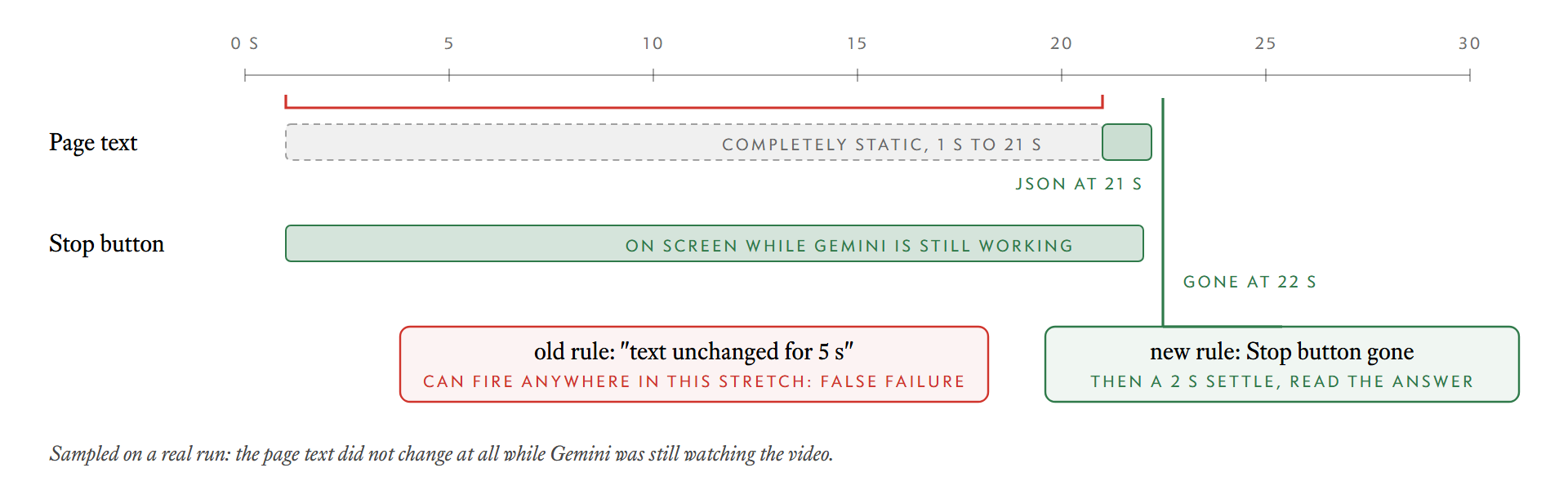
A user reported that clicking Generate Chapters showed "Gemini finished responding without returning chapters" after about 28 seconds and closed the window. I ran the same prompt in a Gemini tab and sampled the page.
The page text was completely static from the first second to the twenty-first, while Gemini's Stop button was on screen. It was still watching the video. The JSON appeared at 21 seconds and the Stop button disappeared at 22. The rule "text unchanged for 5 seconds means done" had fired during the silent stretch of a healthy run.
The signal that does mean done
Text is a poor signal because a model can be working without showing anything. The Stop button is a better one, because it exists only while a response is being generated. I confirmed that it is absent before sending, present only while generating, and absent again afterwards. So the rule became:
- While the Stop button is on screen, keep waiting, whatever the text is doing.
- Once it has been seen and has gone, allow a 2 second settle. If there is still no valid JSON, report a failure.
- If the Stop button is never seen at all, fall back to text quiet, but with a 90 second period instead of 5.
The third rule is the safety net for the day the page changes and the button is not there any more.
Defences around it
A few backstops sit around the main logic, because this is a scrape of a page that can change without notice:
- a timeout in the content script that fires if everything else fails,
- the Gemini window is closed on every failure path, which a later fix had to make true in all cases, and
- a failure shows what Gemini said, so a refusal is visible as a refusal.
What I would carry over
- Prefer a state the page exposes over a timer. A button that exists exactly while work is happening beats a guess about quiet.
- Test the healthy path, not only the failure. The failure I added a rule for was real, and the rule broke the case that worked.
- Sample, do not assume. The text was static for 20 seconds. I would not have guessed that. Sampling the page across a whole run showed it.
- Keep a fallback, and make its patience long. A fallback with a 5 second patience was the original bug.