I started from an open-source Chrome extension that adds chapters to YouTube videos, and extended it: chapters generated for videos that have none, a sidebar in the player, and a small label that names the chapter under the cursor while you scrub the seek bar. Building on a page you do not control is a good way to learn how much of it moves while you are not looking.
The label that disappeared only when you stopped
The bug was easy to describe and hard to catch. Hover along the seek bar and the chapter label follows the cursor. Hold the mouse still, and the label vanished.
It took more than one attempt to fix, and the real cause was not in the hover code. The function that mounts the chapter panel re-runs on every unrelated change to the page nearby. While you scrub, YouTube updates its own tooltip constantly, and each update triggered a re-mount. The re-mount unconditionally tore down and rebuilt the hover listeners, and tearing them down called clearHover().
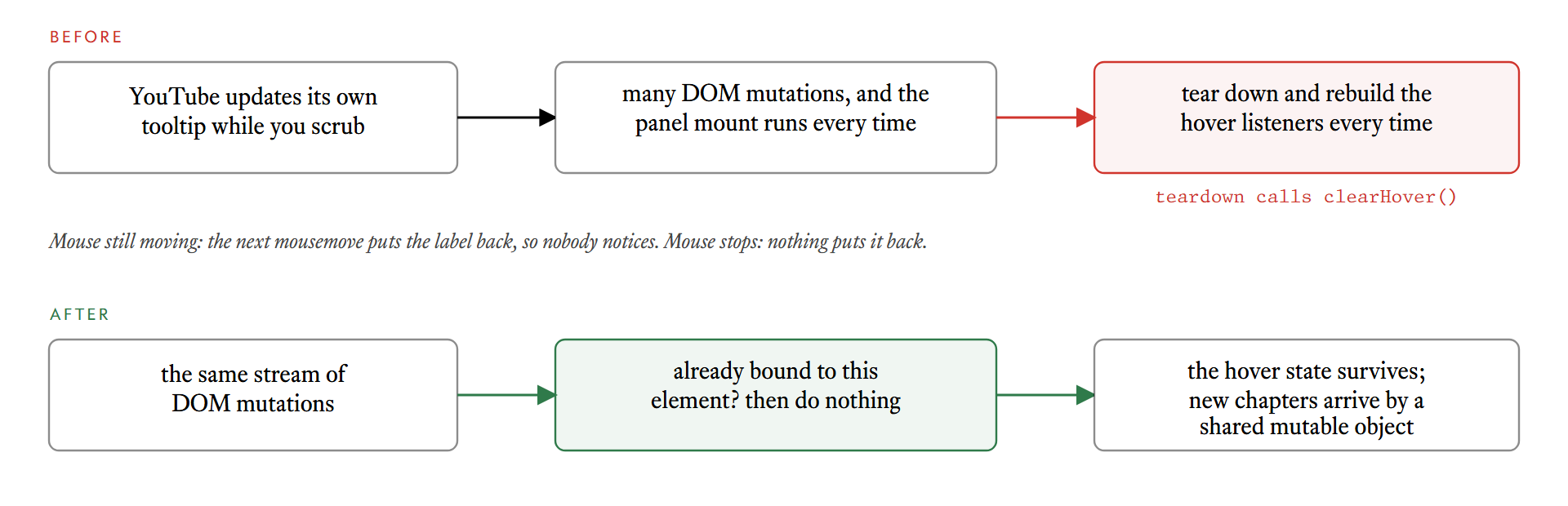
That explains why it only happened when the mouse stopped. While the cursor moved, the next mousemove put the label straight back, fast enough that nobody noticed it flicker. When the cursor stopped, the teardown still happened, and nothing came along to restore the label.
The fix is idempotency: mounting a second time does nothing if the code is already attached to the same element. New chapters, for example after pressing Regenerate, reach the existing listener through a shared mutable object, so a full rebind is not needed:
// sketch of the pattern, not the exact code
if (boundTo === element) {
  shared.chapters = chapters   // update in place
  return                       // and do not tear anything down
}
A regression test fires a burst of unrelated mutations and checks that the hover state survives. It is the only way to keep this fixed, because the failure depends on a stream of events that nobody would think to simulate by hand.
Clicks that do two things
The sidebar closes when you click outside it. The listener runs on the document in the capture phase, which means it fires before the click reaches YouTube's own handler. It closed the sidebar and then let the event carry on, so the same click also paused or played the video underneath.
The fix is for the listener to consume the event when it actually closes the sidebar, so one click does one thing and a second click reaches the player. The test simulates YouTube's click-to-toggle-play on a mock player and checks that closing the sidebar by clicking the video does not trigger it.
Not hiding what you do not recognise
The extension tidies YouTube's own seek bar, hiding YouTube's placeholder chapter segment. The first version hid every element in that container that it did not recognise as its own. If another extension mounted something into the same container, it would have been hidden silently for as long as chapters were showing. Nothing confirmed that happening, but nothing ruled it out either, so now only elements matching YouTube's own segment class are hidden. The README has a section on known interactions with other extensions, because that is a part of the behaviour users should be told about.
Believing what the page says
One more case shows why it pays to check the real page. A video had 8 chapters in YouTube's chapter panel, but its seek bar had exactly one undivided segment. The extension assumed that when a video has native chapters, YouTube has already divided the bar, so it drew nothing. The sidebar listed the chapters and the bar showed none.
The code now counts the segments on the seek bar. Fewer than two means there are no dividers, so it draws its own from the creator's chapters. When YouTube's bar is already divided, it is left alone, as before. The test fixture originally encoded the wrong assumption, so it was changed to match the real video: one undivided native segment.
Takeaways
- Assume the page mutates constantly. Any code that runs on a DOM change will run often. Make it safe to run twice.
- Do not let setup have side effects on state. Teardown that clears the hover is fine until teardown runs more often than you expect.
- Capture-phase listeners are strong. Decide whether you consume the event, and test that.
- Only touch what you can name. Hide elements you recognise, not everything you do not.
- Reproduce on the real page. The seek-bar bug was invisible until it was checked on the video that reported it.