Accessibility work has a reputation for being a large project. A lot of the value comes from a short list of small changes that are easy to skip because nothing is visibly broken. This is the pass I did on this site in one sitting, and what each change actually does.
1. Text that passes contrast
The site uses black ink at different opacities for secondary text. The quiet tier, used for metadata, was set at 42 percent opacity, which looks elegant and is hard to read. WCAG asks for a contrast ratio of at least 4.5 : 1 for small text. Because black at a given opacity over white is just a grey, the ratio can be calculated exactly:
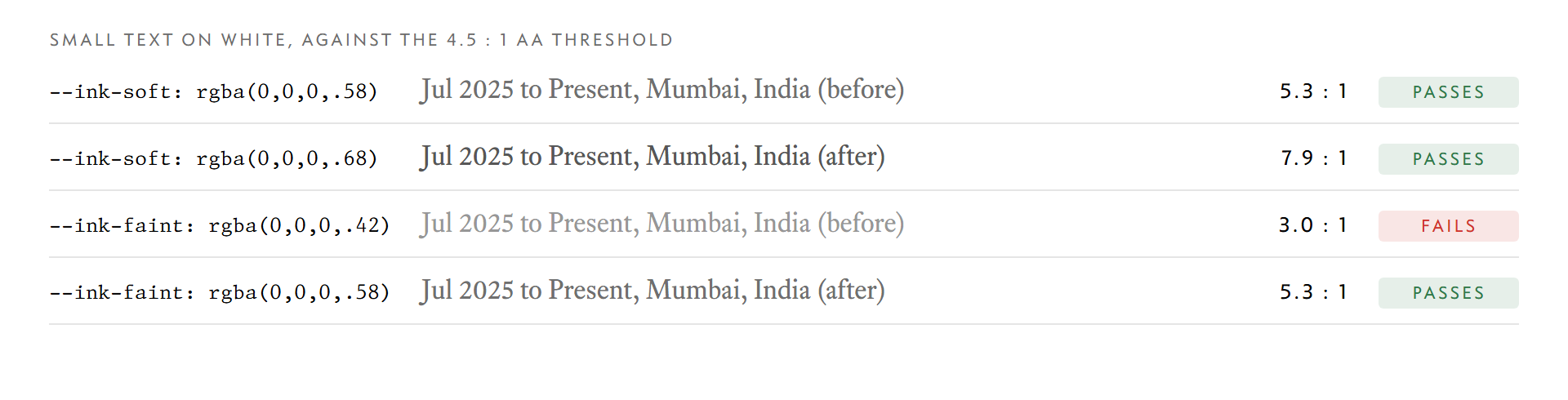
The change was two numbers in the root of the stylesheet:
:root {
  /* Both clear WCAG AA (4.5:1) for small text on the white paper. */
  --ink-soft: rgba(0, 0, 0, 0.68);
  --ink-faint: rgba(0, 0, 0, 0.58);
}
Because every secondary colour comes from a variable, one edit fixed it everywhere. If each place had hard-coded its own grey, this would have been a hunt through the stylesheet.
2. A skip link
Someone using a keyboard has to tab through the navigation on every page before they reach the content. A skip link is the first focusable element and jumps past it. It is invisible until it takes focus:
.skip-link {
  position: fixed;
  top: 0.5rem;
  left: var(--gutter);
  z-index: 100;
  transform: translateY(-200%);
}
.skip-link:focus {
  transform: none;
}
It needs a target, so the <main> element got id="main". Pressing Tab once on the About page focuses it:

3. Focus rings for the keyboard only
Browsers draw a focus ring, and designers often remove it because it appears when you click with a mouse. The better answer is :focus-visible, which shows the ring for keyboard navigation and leaves mouse clicks alone:
a:focus-visible,
button:focus-visible,
.ref:focus-visible {
  outline: 2px solid var(--accent);
  outline-offset: 3px;
}

The .ref selector covers the company names that open preview cards. They are focusable and open their card on focus, so a keyboard user can read them as well.
4. Print styles
The About page doubles as a resume, so people print it. By default a printout includes the navigation and footer, which are useless on paper. A few lines remove them:
@media print {
  nav,
  .skip-link,
  footer {
    display: none;
  }
  body {
    margin: 0;
    padding-top: 0;
  }
}
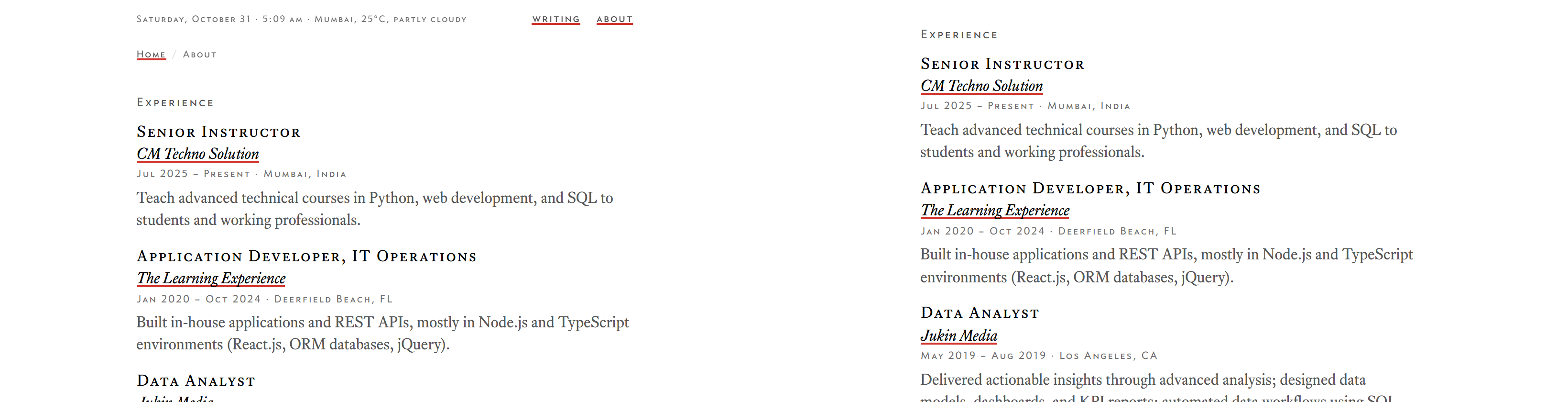
Smaller things in the same commit
Text selection got a soft tint from the accent colour so it matches the rest of the page. The sitemap now reports a real modification date per page, and the 404 page stopped claiming a canonical URL, which is not an accessibility fix but is the same kind of detail: it was fine until someone looked.
Checking it
Everything here can be tested without a tool. Put the mouse aside and press Tab through a page: you should always see where you are, and the first stop should be the skip link. Print the page, or use your browser's print preview. For contrast, black at a known opacity over white needs only the standard luminance formula, which is all the chart above is.
None of this replaces testing with a screen reader or with real users, and I have not done that here. It is the part that costs almost nothing, so there is little reason to leave it out.