Most self-hosting guides end the same way: forward ports 80 and 443 on your router and hope. I did not want that. A box at home that answers to the whole internet is a box I have to worry about every time a new vulnerability lands.
So I built a small homelab with a different rule: nothing is open on the router, ever. It still works from a phone on mobile data and from a laptop in a café. Here is how the pieces fit, and the few decisions that mattered.
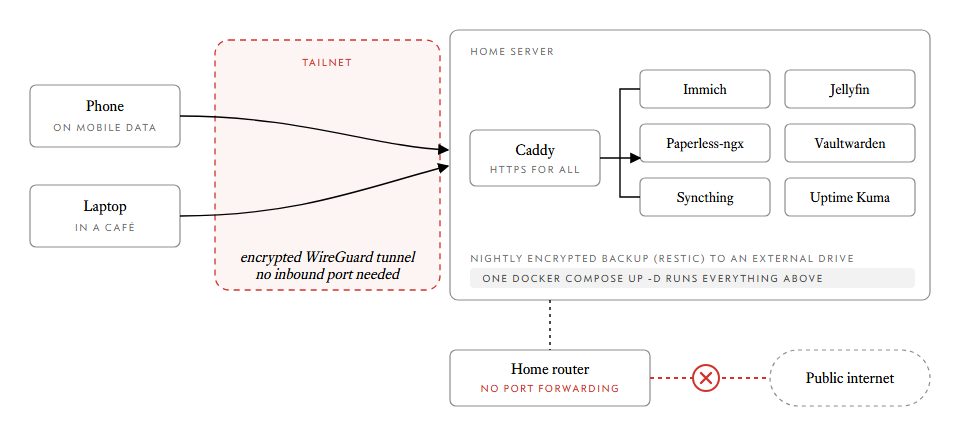
What runs on it
One always-on machine runs seven services, each doing a job I used to hand to someone else's cloud:
- Immich replaces Google Photos.
- Jellyfin replaces a streaming subscription, for your own files.
- Paperless-ngx replaces the shoebox of paper: scan it, OCR it, search it.
- Vaultwarden replaces a hosted password manager, using the Bitwarden apps.
- Syncthing does Dropbox-style folder sync.
- Uptime Kuma tells you something broke before you need it.
- Caddy is the front door, with HTTPS for everything above.
One command to run everything
Every service has its own small docker-compose.yml under services/<name>/.
The top-level file does nothing but pull them together with include::
include:
  - services/caddy/docker-compose.yml
  - services/immich/docker-compose.yml
  - services/jellyfin/docker-compose.yml
  - services/paperless/docker-compose.yml
  - services/vaultwarden/docker-compose.yml
  - services/syncthing/docker-compose.yml
  - services/uptime-kuma/docker-compose.yml
That keeps each service readable on its own, and bringing the lot up is one line:
docker compose up -d
include: needs Compose 2.20 or newer, which is why the guide installs Docker
from Docker's own apt repository instead of trusting the older docker.io
package Ubuntu ships.
The trick: Tailscale instead of port forwarding
The server joins a private network called a tailnet, and so do my phone and laptop. Traffic between them travels over an encrypted WireGuard tunnel, and Tailscale sorts out getting through your router by itself. The router never needs a forwarding rule.
curl -fsSL https://tailscale.com/install.sh | sh
sudo tailscale up --ssh
Two small admin-console steps save you from a nasty surprise later. Disable key expiry for the server, otherwise it quietly drops off the tailnet after a few months and you find out while you are away from home. And turn on the "always on" VPN option on your phone, so the Immich photo backup just works when you are out.
Names and HTTPS
Each service gets its own hostname, such as photos.home.example.com. If you
own a domain, one wildcard DNS record pointing at the server's Tailscale
address is enough. Yes, that is a public record pointing at a private address.
Anyone can look it up, and only devices on your tailnet can reach it.
Caddy handles the certificates. It can run its own tiny certificate authority, which needs no accounts and no internet, or get real Let's Encrypt certificates through a DNS challenge, which still needs no open ports. The Caddyfile uses a shared block so every site gets the same treatment:
(common) {
	import tls_{$TLS_MODE}
	encode zstd gzip
	header -Server
}

photos.{$DOMAIN} {
	import common
	reverse_proxy immich_server:2283
}
Switching between the two certificate modes is a single environment variable.
Hardware
You do not need much. An Intel N100 mini PC with 16 GB of RAM is the sweet spot. It idles at around 6 to 10 watts, which is a few coffees a year in electricity, and its integrated graphics handle Jellyfin transcoding without effort. An old laptop works for a start, as long as you set the lid switch to do nothing.
Two settings matter more than any spec. Use wired Ethernet, because a box that drops off Wi-Fi at 3am misses its backup. And in the BIOS, set Restore on AC Power Loss to Power On, so a power cut does not leave you with a dead server until you walk over and press the button.
Backups, or it did not happen
A nightly restic job writes encrypted backups to an external drive, started by a systemd timer. The part people skip is the restore guide. I wrote one, because a backup you have never tried to restore is a hope, not a backup.
What I would tell a friend
Pin your image versions, because Immich in particular needs its server and
machine learning containers to match. Keep every secret in a gitignored .env
file and commit only the .env.example. And write everything so that one person
can paste it into a terminal and get the same result, because that person will
be you in a year, after you have forgotten all of this.