For a while, opening this site painted the page in a default serif first. A moment later the real typefaces arrived and every line shifted. It lasted a fraction of a second, but it was the first thing a visitor saw.
The fix has three parts: get the fonts early, hold the page back until they are ready, and then bring the content in on purpose. Here is how each works, plus the mistakes I made on the way.
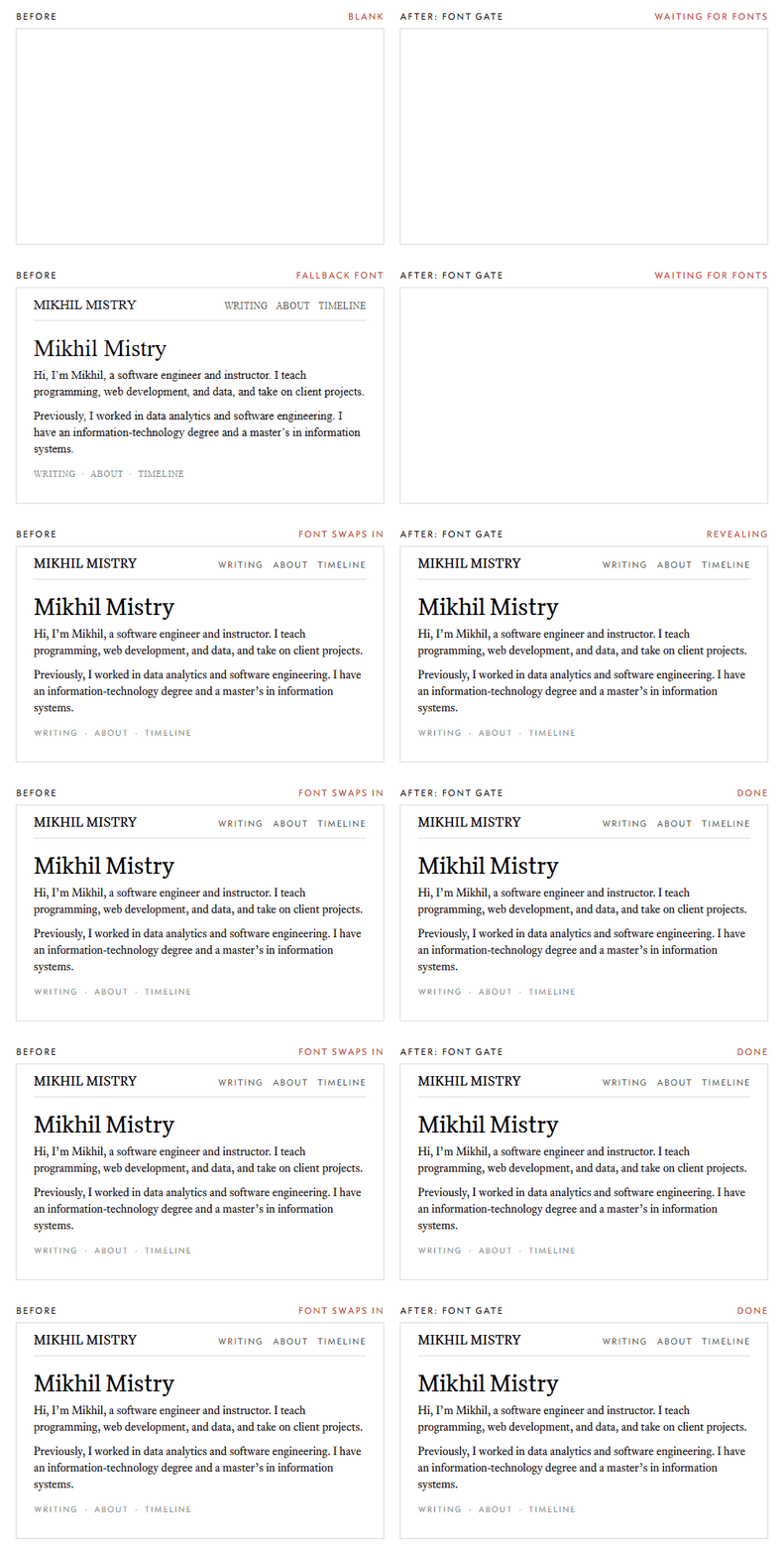
Why the flash happens
A browser cannot know which font files a page needs until it has downloaded and
parsed the CSS and started laying out text. Only then does it request them.
Until they arrive, font-display: swap tells it to show a fallback face
instead.
So the sequence is: paint in the fallback, download the fonts, swap, reflow. That swap is the flash.
Step 1: start the downloads sooner
The first fix is to tell the browser about the fonts in the HTML <head>,
before it has read any CSS. That is what rel="preload" is for:
// app/layout.tsx
const CRITICAL_FONTS = ["text-r", "text-i", "display-r", "caps-r", "sanscaps-r"];

export default function RootLayout({ children }) {
  return (
    <html lang="en" suppressHydrationWarning>
      <head>
        {CRITICAL_FONTS.map((f) => (
          <link
            key={f}
            rel="preload"
            href={`/fonts/${f}.woff2`}
            as="font"
            type="font/woff2"
            crossOrigin="anonymous"
          />
        ))}
      </head>
      <body>{children}</body>
    </html>
  );
}
Two details matter. The list holds only the faces visible above the fold on
almost every page, not all eight, because every preload competes for
bandwidth. And crossOrigin="anonymous" is required even for fonts on your own
domain: browsers fetch fonts in CORS mode, and without the attribute the
preloaded file is not reused, so it downloads twice.
Preloading shortens the flash. It does not remove it, because the page can still paint before the files land.
Step 2: hold the page until the fonts are ready
To remove the flash, the page has to stay invisible until the critical faces
are loaded. A tiny inline script in the <head> does this before first paint:
(function () {
  var d = document.documentElement;
  if (!document.fonts || !document.fonts.load) return;
  d.classList.add("fonts-loading");
  var done = false;
  function reveal() {
    if (done) return;
    done = true;
    d.classList.replace("fonts-loading", "fonts-reveal");
    setTimeout(function () { d.classList.remove("fonts-reveal"); }, 2000);
  }
  Promise.all(
    ["1em text", "italic 1em text", "1em display", "1em caps", "1em sanscaps"]
      .map(function (f) { return document.fonts.load(f); })
  ).then(reveal, reveal);
  setTimeout(reveal, 1200);
})();
and one CSS rule:
html.fonts-loading body {
  opacity: 0;
}
document.fonts.load() returns a promise that resolves once a face is
available, so Promise.all over the critical ones tells us when the page can
safely appear. Three choices are worth explaining:
- A timeout. If the network is slow, hiding the page indefinitely is worse than a font swap. After 1.2 seconds the gate lifts regardless, and the visitor gets the fallback text instead of a blank screen.
- No JavaScript, no problem. The hiding class is added by the script, never written into the markup. If scripts are off or blocked, nothing is ever hidden and the page renders as usual.
- The script runs before paint. It sits in the
<head>as inline code, so the class is set before the browser draws anything. An external or deferred script would arrive too late and you would see the flash anyway.
Step 3: hydration and a warning
Next.js sends the page as server-rendered HTML, then loads React in the browser and hydrates it: React attaches to the existing markup, wires up event handlers and state, and from then on the page behaves like a normal React app. React expects the HTML it finds to match what it would have rendered itself.
My gate script adds a class to <html> before React hydrates. React sees an
attribute it did not render and logs a hydration mismatch. Since the difference
is deliberate, the fix is one prop:
<html lang="en" suppressHydrationWarning>
It applies only to that element's own attributes, not to anything inside it, so it does not hide real mismatches elsewhere in the tree.
Step 4: bring the content in on purpose
The first version simply faded the whole body in once the fonts were ready. A second pass replaced it with a short staggered entrance: the navigation fades in, then each block of the page rises into place in reading order, ending with the footer.
@keyframes enter-rise {
  from {
    opacity: 0;
    transform: translateY(0.6rem);
  }
}

html.fonts-reveal #post > * {
  animation: enter-rise 0.7s cubic-bezier(0.2, 0.7, 0.2, 1) backwards;
  animation-delay: 0.1s;
}

html.fonts-reveal #post > :nth-child(2) { animation-delay: 0.18s; }
html.fonts-reveal #post > :nth-child(3) { animation-delay: 0.26s; }
/* and so on, eight hundredths of a second apart */
A few rules keep it from causing trouble:
- Fill mode
backwards, notboth. The animation holds its starting state during the delay but lets go of everything when it ends. Nothing keeps atransform, which matters here: a transformed ancestor becomes the containing block forposition: fixeddescendants, and the reference cards inside the text are fixed-position. A lingering transform would have moved them out of place. - Only opacity and transform. Those two properties animate on the compositor without triggering layout, so the entrance stays smooth even on slow devices.
- The class is removed afterwards. The script drops
fonts-revealafter two seconds, so client-side navigation between pages does not replay the entrance. It is a first-visit effect, not a transition on every click. - Respecting reduced motion. Anyone who has asked their system for less motion gets no animation at all:
@media (prefers-reduced-motion: reduce) {
  html.fonts-reveal * {
    animation: none !important;
  }
}
Testing the reduced-motion path
On Windows, the "Show animations in Windows" setting is what browsers read as
prefers-reduced-motion. With it off, the CSS above disables the entrance and
only the hide-then-appear part remains. With it on, the full staggered entrance
runs. Test with the setting both ways: the reduced-motion path is a real code
path that real people use.
The one I missed: italics
Once the gate was in, one page still flashed. On the About page, the company names are links set in italics, and a moment after the page appeared their typeface changed.
The cause was simple. The gate waited for four faces: roman text, display, small caps and sans caps. The italic cut is a separate file, not in that list, so the browser only fetched it after it saw italic text on the page, which was after the reveal.
The fix was to add text-i to both the preload list and the gate, as shown in
the code above. The italic file is about 27 KB, and posts use it for emphasis too,
so I applied it to every page rather than only About.
The general lesson: the gate is only as good as its list. Any face that shows up on a page without being in the list will swap in late. When a page flashes, find which face it is, and either add it to the list or accept the swap. The bold cut, for instance, is deliberately not in the list because nothing above the fold uses it.
Smooth scrolling
The last piece is not about loading at all, but it belongs to the same feel. Browsers scroll in steps: each tick of the mouse wheel jumps a fixed distance. Lenis is a small library, about 3 KB, that intercepts wheel input and eases the scroll position toward its target, so the page glides and settles. Importantly it still scrolls the real document and applies no transforms, so fixed elements keep working and touch devices keep their native scrolling.
It is one client component:
"use client";

import { useEffect } from "react";
import Lenis from "lenis";
import "lenis/dist/lenis.css";

export default function SmoothScroll() {
  useEffect(() => {
    if (window.matchMedia("(prefers-reduced-motion: reduce)").matches) return;

    const lenis = new Lenis({ anchors: true });
    let raf = requestAnimationFrame(function tick(time) {
      lenis.raf(time);
      raf = requestAnimationFrame(tick);
    });

    return () => {
      cancelAnimationFrame(raf);
      lenis.destroy();
    };
  }, []);

  return null;
}
Render it once inside the providers, and remove any scroll-behavior: smooth
from your CSS: the two animate the same scroll and fight each other. As with
the entrance, it switches itself off for visitors who prefer reduced motion.
I checked it by sampling scrollY after a wheel event. The values decelerate
into place (490, 495, 498, 499) instead of stopping dead, which is the easing
doing its job. In-page anchor links land correctly beneath the fixed header
because the existing scroll-margin-top is respected. In scripted tests they
jumped to the target rather than gliding.
What it costs
- On a slow first visit, readers see a blank page for up to 1.2 seconds instead of a flash of fallback text.
- Preloading five fonts is about 125 KB up front, competing with everything else on a cold load. Repeat visits come from cache and the gate lifts almost instantly.
- Every effect has an off switch: no JavaScript, a slow network and reduced motion each fall back to a plain, working page.