I keep a small personal dashboard for books and films. It is a Python server on my own machine, and one day I found two copies of it answering on the same port, one of them running old code. The bug was not in the code at all.
Two servers, one port
Starting the server a second time without stopping the first does not fail on Windows. Windows lets two programs listen on the same port, and the browser then reaches either one at random. An earlier copy left running keeps answering with the code it started with, so a refresh could show either version.
The fix has two parts. First, the server refuses to share its port, using the exclusive-address socket option that Windows provides:
class OneServer(ThreadingHTTPServer):
    """Refuses to share its port, so there is only ever one copy answering."""
    allow_reuse_address = False
    daemon_threads = True

    def server_bind(self):
        import socket
        if hasattr(socket, "SO_EXCLUSIVEADDRUSE"):
            self.socket.setsockopt(socket.SOL_SOCKET, socket.SO_EXCLUSIVEADDRUSE, 1)
        super().server_bind()
Second, a new copy stops an older one first. It finds the process listening on its port, checks the command line, and only kills it if it is recognisably its own earlier copy. Killing whatever happens to hold a port would be rude at best:
cmd = subprocess.run(["powershell", "-NoProfile", "-Command",
    "(Get-CimInstance Win32_Process -Filter 'ProcessId=%s').CommandLine" % pid],
    capture_output=True, text=True, timeout=30).stdout
if me in cmd or "http.server" in cmd:   # only ever our own earlier copy
    subprocess.run(["taskkill", "/PID", pid, "/T", "/F"], capture_output=True, timeout=20)
Binding retries for about ten seconds, because the old copy can take a moment to let go of the port.
Restarting when the code changes
With only one copy running, the next annoyance was restarting it by hand after every edit. The window I start now runs a small supervisor. It launches the real server as a child process and relaunches it whenever a code file changes. The server checks file modification times every two seconds and exits with a special code, 3, when something changed. The supervisor treats that code as "start again" and anything else as "stop".
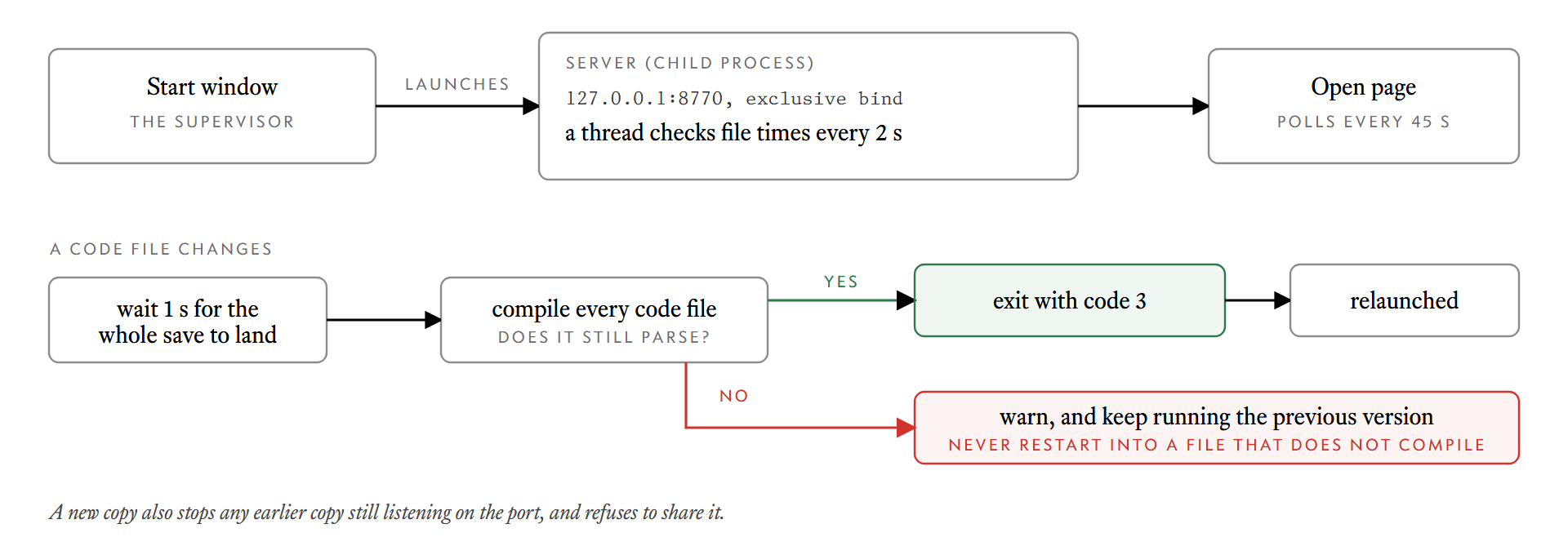
The detail that makes this safe to leave running is the compile check. Before restarting, the server compiles every code file. If one has a syntax error, it does not restart:
time.sleep(1)                      # let a multi-file save finish
for f in CODE_FILES:               # never restart into a file that does not compile
    compile((ROOT / f).read_text(encoding="utf-8"), f, "exec")
os._exit(RESTART_CODE)
On a syntax error it prints a warning and keeps serving the previous version. A half-saved file therefore costs a message in the console and nothing else. The one-second pause lets an editor finish writing several files before the check runs.
The page follows the server
Restarting the server is only half of it, because an open browser tab keeps showing the old page. The page polls every 45 seconds while it is visible, and redraws only when the data changed. The server also reports a version number built from the modification times of the page's own files, so when app.js or the stylesheet changes, the page reloads itself.
Together, the loop is: save a file, the server restarts within a few seconds, and the open tab updates. It starts at logon too, so I never launch it by hand.
What I would do the same way
- Make the bad state impossible, then recover from it. The exclusive bind stops a second copy from sharing the port. The retirement step handles the case where one is already there.
- Identify before you kill. Checking the command line before
taskkillis one extra call and removes the risk of stopping someone else's process. - Never restart into broken code. The cheap check of compiling first turns a typo into a console warning.
- Print something. Each restart says "Code updated: restarted at 14:02:11". If a tool restarts itself silently, you stop being sure what is running.
None of this is sophisticated. It is the kind of plumbing that a tool you use every day deserves, and that most scripts never get.